Attendance Management
Here Manager/HR can view & edit daily employee attendance.
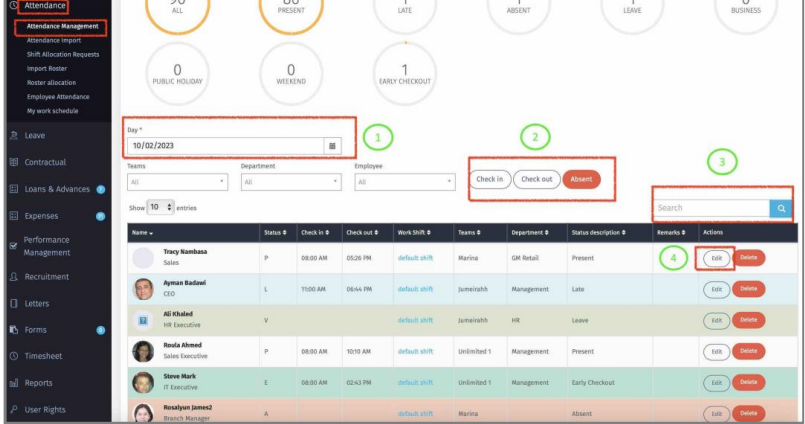
1 – Select the date to display employee attendance.
2 – Perform mass Check-In/Check-out/Delete of daily attendance.
3 – Search by employee to view attendance.
4 – Click “Edit” to view and modify employee attendance.
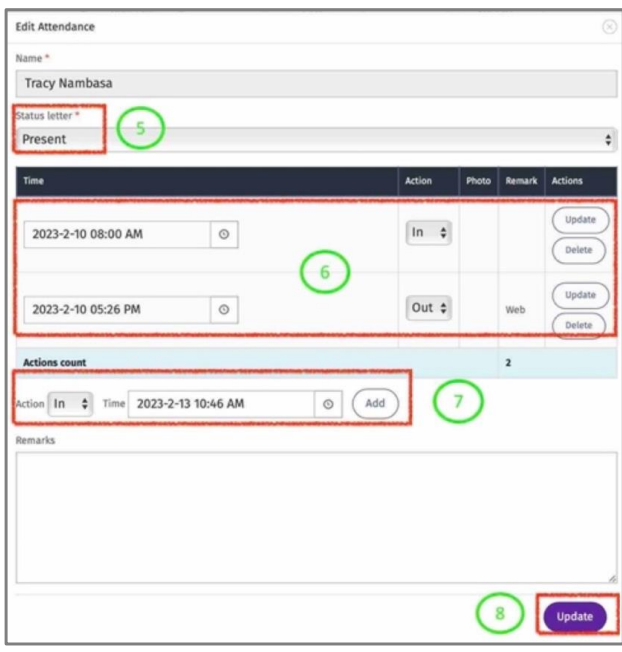
5 – Select attendance status for employee.
6 – View/update/Delete employee Check-In/Out.
7 – Add Check-In/Out for employee by selecting the date and the time.
8 – Click “Update” to save changes.
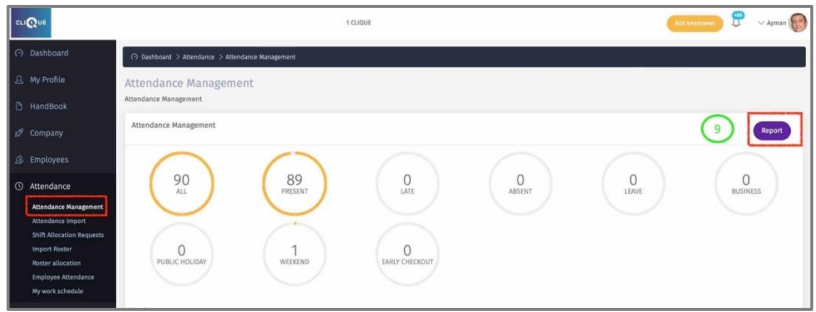
9 – Generate attendance report. This report can be accessed from:
o Attendance management Screen.
o Reports Module: Reports/Standard Reports/Attendance.
10 – Select from the provided filters the required Attendance Data.
11 – Download the report in Excel Format.